
How to write a quote clients say yes to
A quote wins when the client can see their problem described accurately and a clear, fair price for solving it.
Structure
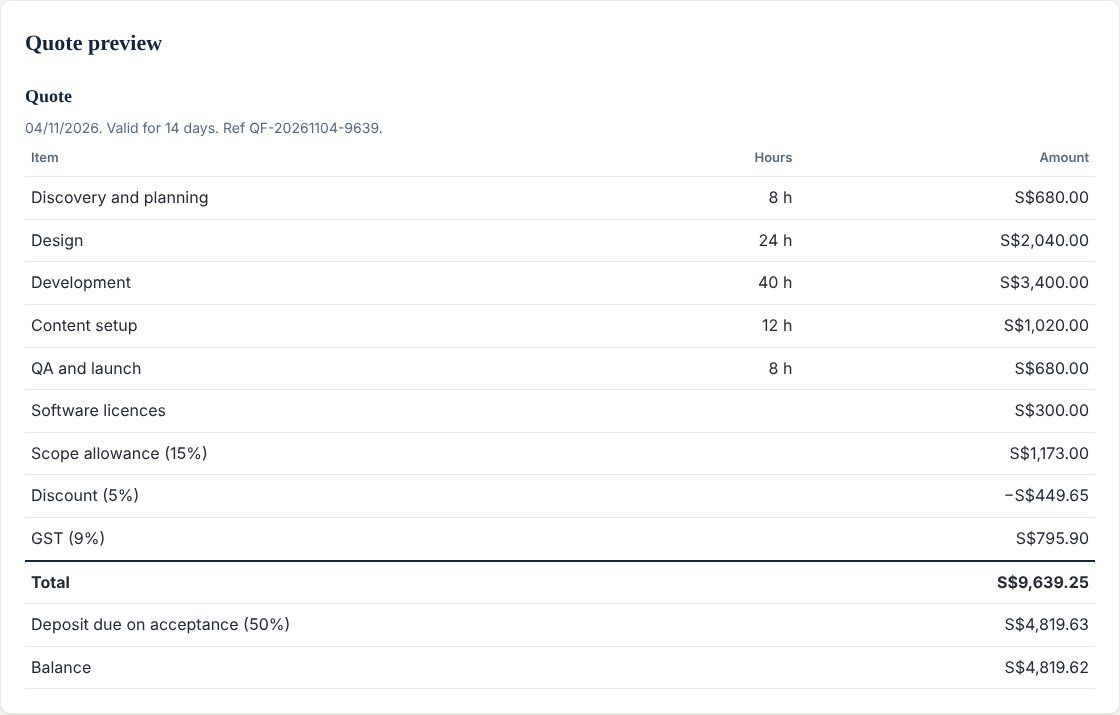
Open with the client's goal in their words, then list the work in lines with hours and amounts, any fixed costs such as software licences, the tax, the total, and the deposit due on acceptance. State how long the quote is valid, and end with one clear next step.
Avoid
Vague scope, hidden extras and long jargon. List your assumptions so changes can be priced fairly later.
Check the numbers before you send
A quote can look reasonable and still undercut you. QuoteFlow shows your effective hourly rate, which is what you really earn per hour after the buffer and any discount. If you give a discount, it also shows how many hours of work that gives away. You can add a minimum hourly rate and a cost per hour to see a health check and your profit.
Send it from your own inbox
QuoteFlow prepares the quote as a table you can paste into an email, or opens a ready-written email in your own mail app. The email ends with Accept and Decline links that reply to the address you enter, and nothing is sent through our servers.
Build yours in the free QuoteFlow calculator, or learn more on the QuoteFlow page. Not sure what rate to build it on? See how to work out your minimum freelance rate.