
How to spot IT project budget risks early
Most overruns are not surprises. They come from a short list of causes that can be checked on day one, if you know what to look for.
Three risks, ranked by dollar impact
- A budget that is too tight. Flagged when the budget you were given sits more than 10% below the suggested midpoint. Budgets fixed before the scope is final often land below what the work really costs.
- Hidden dependencies. External systems and integrations are a common source of estimating misses. ScopeFlow treats each dependency as roughly 40% of a module's effort and adds that cost to the picture.
- Missing contingency. The recommended buffer is 15%. If you have already allowed 10%, the calculator shows the 5% still missing rather than the full amount.
ScopeFlow ranks whichever risks apply by how much money each puts at stake, so you start with the biggest one.
See it on the timeline too
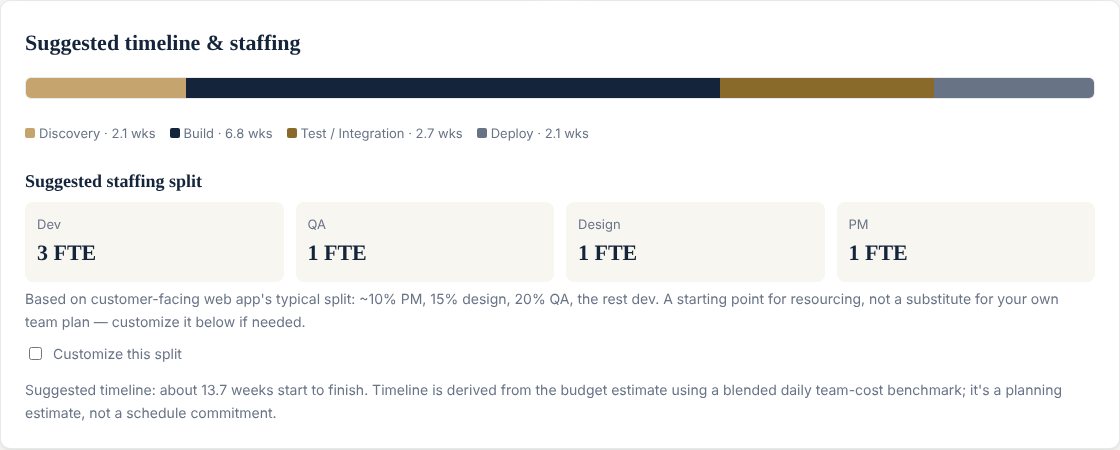
The budget also drives a timeline, split into Discovery, Build, Test and Deploy. For a 12-module web app with a six-person team, the calculator suggests about 13.7 weeks start to finish. Dependency drag is added to the Test phase, because that is where integrations tend to hurt.
And the team
For the same project, ScopeFlow suggests three developers, one QA, one designer and one project manager. It is a starting point for resourcing, and you can customise the split.
The timeline is a planning estimate, not a schedule commitment. Check your own project in the free ScopeFlow calculator, and start with how to estimate an IT project budget if you have not set a range yet.